
[Claude Code] Architecture of KAIROS, the Unreleased Always-on Background Agent
Design · Five mechanisms that turn a chat loop into a long-lived autonomous agent

Someone on Reddit ran Claude Code for 17 hours straight by building a custom session continuity layer on top. The community finds ways to make a chat-based tool act like a long-lived system.
Anthropic has been building the same thing from the inside. The source code contains an unreleased always-on assistant mode called KAIROS. It has a proactive tick engine, a sleep mechanism with explicit cost trade-offs, append-only memory for perpetual sessions, and a dedicated messaging layer.
Tick Loop: Proactive Engine Under the Hood
To understand the tick loop, you need to know how Claude Code works under the hood. Claude Code is a Node.js process that runs locally on your machine. It maintains a message queue, a list of pending inputs that need processing. When you type a message, it goes into this queue. When a tool finishes executing, its result goes into this queue. A run() function pulls messages from this queue, sends them to the Claude API, and processes whatever comes back.
In normal mode, the loop is simple: you type something → it enters the queue → run() sends it to the API → the model responds (possibly with tool calls that produce more queue entries) → eventually the model is done and the queue is empty → Claude Code waits for your next input.
The <tick> loop changes that last step. Instead of waiting for user input when the queue is empty, the system injects a <tick> message into the queue:
const scheduleProactiveTick =
  feature('PROACTIVE') || feature('KAIROS')
    ? () => {
        setTimeout(() => {
          if (
            !proactiveModule?.isProactiveActive() ||
            proactiveModule.isProactivePaused() ||
            inputClosed
          ) {
            return
          }
          const tickContent = `<${TICK_TAG}>${new Date().toLocaleTimeString()}</${TICK_TAG}>`
          enqueue({
            mode: 'prompt' as const,
            value: tickContent,
            uuid: randomUUID(),
            priority: 'later',
            isMeta: true,
          })
          void run()
        }, 0)
      }
    : undefined
The setTimeout(0) doesn’t fire immediately. It yields to the event loop first, giving pending stdin messages a chance to process before the tick fires. This is how the proactive loop stays interruptible: user input can still preempt the next autonomous turn.
When the model receives the tick, the system prompt tells it what to do:
src/constants/prompts.ts:L864-L868
You are running autonomously. You will receive `<tick>` prompts that keep you
alive between turns — just treat them as "you're awake, what now?" The time
in each `<tick>` is the user's current local time. Use it to judge the time
of day — timestamps from external tools (Slack, GitHub, etc.) may be in a
different timezone.
Multiple ticks may be batched into a single message. This is normal — just
process the latest one. Never echo or repeat tick content in your response.
That's the core proactive loop. When the model finishes a response and no messages are waiting, the system injects a tick, and the model decides what to do next. The entire mechanism is a single event-loop callback that re-enters the same message processing pipeline as user input.
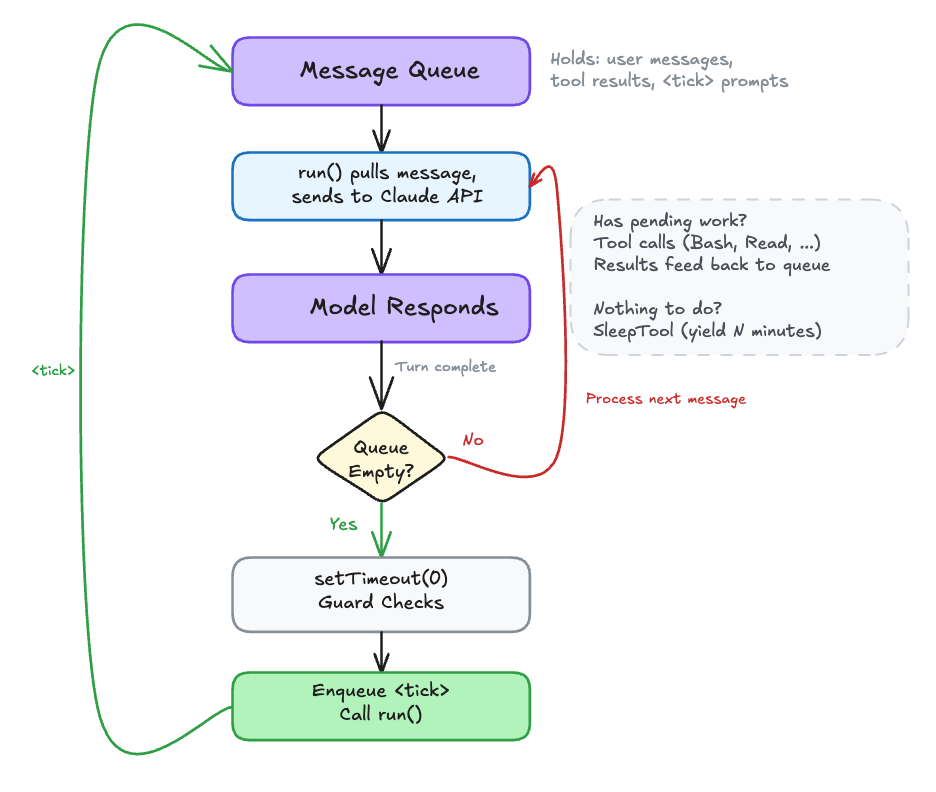
But a tick is just a nudge. It gives the model a turn, not a task. The model receives the tick as a message, looks at its conversation history for anything worth acting on (a user instruction like “watch CI,” an earlier command still running, an unresolved thread), and responds with tool calls if there’s work to do. If no pending instructions or no background tasks to check, the model’s reasonable move is to call SleepTool and yield until the next tick. Every tick without useful work is a wasted API call, which is the problem SleepTool solves.
SleepTool: How the Proactive Loop Yields
Sleep lives in the same layer as ticks. main.tsx explicitly notes that assistant mode alone leaves SleepTool disabled. It only becomes available once proactive mode is active. It exists to throttle ticks, not as a general-purpose assistant feature.
Without Sleep, an idle agent would burn API calls spinning on empty ticks. The SleepTool lets the agent explicitly yield control:
src/tools/SleepTool/prompt.ts:L7-L17
export const SLEEP_TOOL_PROMPT = `Wait for a specified duration.
The user can interrupt the sleep at any time.

Use this when the user tells you to sleep or rest, when you
have nothing to do, or when you're waiting for something.

You may receive <tick> prompts — these are periodic check-ins.
Look for useful work to do before sleeping.

You can call this concurrently with other tools — it won't
interfere with them.

Prefer this over \`Bash(sleep ...)\` — it doesn't hold a shell
process.

Each wake-up costs an API call, but the prompt cache expires
after 5 minutes of inactivity — balance accordingly.`
That last line captures the core trade-off. Each wake-up is an API call. But if the agent sleeps too long, the prompt cache expires and the next call rebuilds it from scratch. The model is told to balance these costs directly. The agent is balancing cost against responsiveness every time it decides how long to sleep.
15-Second Budget: Keeping the Assistant Responsive
An always-on coding assistant that launches make build and waits 10 minutes for it to finish isn’t useful. KAIROS enforces a 15-second blocking budget on shell commands. If a command is still running after 15 seconds, KAIROS silently moves it to a background task so the agent can continue working. Nothing gets killed or lost:
src/tools/BashTool/BashTool.tsx:L57
const ASSISTANT_BLOCKING_BUDGET_MS = 15_000;src/tools/BashTool/BashTool.tsx:L973-L983
// In assistant mode, the main agent should stay responsive.
// Auto-background blocking commands after ASSISTANT_BLOCKING_BUDGET_MS
// so the agent can keep coordinating instead of waiting.
// The command keeps running — no state loss.
if (feature('KAIROS') && getKairosActive() && isMainThread
    && !isBackgroundTasksDisabled && run_in_background !== true) {
  setTimeout(() => {
    if (shellCommand.status === 'running'
        && backgroundShellId === undefined) {
      assistantAutoBackgrounded = true;
      startBackgrounding(/* ... */);
    }
  }, ASSISTANT_BLOCKING_BUDGET_MS).unref();
}
The agent gets notified when it completes and can move on to other work in the meantime. The .unref() on the timer prevents it from keeping the Node process alive if everything else has shut down.
The blocking budget prevents the single-threaded agent from stalling on any one operation.
Append-Only Memory: How Assistant Mode Remembers
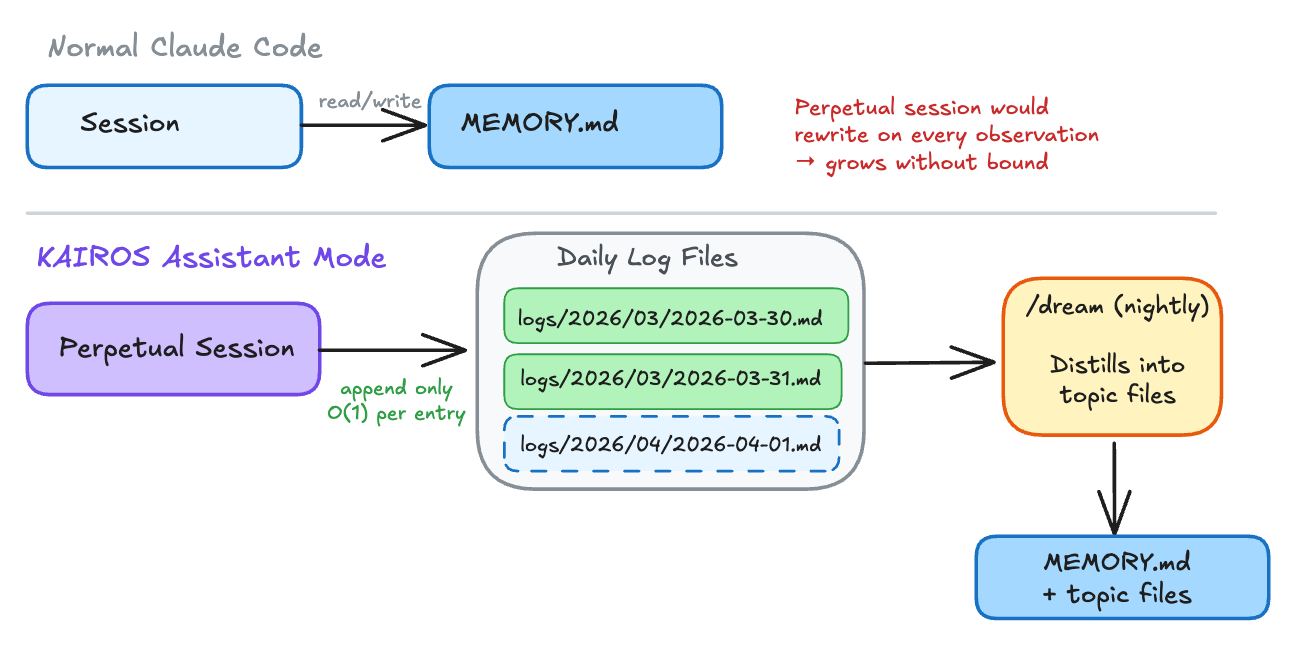
Normal Claude Code sessions maintain a MEMORY.md file, reading and rewriting it as context evolves. Assistant mode can’t keep rewriting the same file indefinitely. Instead, it switches to append-only daily logs:
src/memdir/memdir.ts:L319-L348
/**
 * Assistant-mode daily-log prompt. Gated behind feature('KAIROS').
 *
 * Assistant sessions are effectively perpetual, so the agent writes
 * memories append-only to a date-named log file rather than
 * maintaining MEMORY.md as a live index. A separate nightly /dream
 * skill distills logs into topic files + MEMORY.md. MEMORY.md is still
 * loaded into context (via claudemd.ts) as the distilled index — this
 * prompt only changes where NEW memories go.
 */
function buildAssistantDailyLogPrompt(skipIndex = false): string {
  // ...
  const lines: string[] = [
    'This session is long-lived. As you work, record anything worth '
    + "remembering by **appending** to today's daily log file:",
    '',
    `\`${logPathPattern}\``,  // logs/YYYY/MM/YYYY-MM-DD.md
    // ...
    'Do not rewrite or reorganize the log — it is append-only. '
    + 'A separate nightly process distills these logs into '
    + '`MEMORY.md` and topic files.',
  ]
}
The daily log path follows the pattern logs/YYYY/MM/YYYY-MM-DD.md. When the date rolls over mid-session, the agent starts appending to a new file. A separate nightly process, the /dream command, distills these raw logs into structured topic files and updates the MEMORY.md index. It’s basically a write-ahead log for AI memory.
SendUserMessage: A Reusable Output Channel
Claude Code has a tool internally called BriefTool, exposed to the model under the name SendUserMessage. In normal terminal mode, the model’s text output streams straight to stdout. In brief/chat mode, that raw output is collapsed into a detail view that most users never expand. The model’s actual reply goes through SendUserMessage instead. KAIROS force-enables this because a background agent can’t dump text into stdout and assume anyone will notice.
Once active, the prompt is blunt about the contract:
src/tools/BriefTool/prompt.ts:L12-L22
SendUserMessage is where your replies go. Text outside it is visible
if the user expands the detail view, but most won't — assume unread.
Anything you want them to actually see goes through SendUserMessage.

The failure mode: the real answer lives in plain text while
SendUserMessage just says "done!" — they see "done!" and miss
everything.
The model’s status field marks intent: 'normal' for replies to user messages, 'proactive' for unsolicited updates. Downstream routing uses this to decide notification behavior: ping the user or silently log the update.
The UI enforces this contract at the rendering layer. The tool call itself renders as an empty string, so the user never sees “calling SendUserMessage...” in the output. The result renderer switches on view mode: in brief-only (chat) view, it renders as a labeled “Claude” message; in transcript mode (ctrl+o), it gets a bullet marker to stand out; in default view, it renders as plain text with no tool chrome.
The filtering happens upstream in Messages.tsx. There are three tiers. In brief-only mode, filterForBriefTool strips everything except SendUserMessage tool blocks and real user input. If the model forgets to call SendUserMessage in a turn, the user sees nothing for that turn. In default mode, dropTextInBriefTurns keeps tool calls visible but drops redundant assistant text in turns where SendUserMessage was called. In transcript mode (ctrl+o), nothing is filtered.
These three tiers are wired together in a single expression:
src/components/Messages.tsx:L505-L514
// Three-tier filtering. Transcript mode (ctrl+o) is truly unfiltered.
// Brief-only: SendUserMessage + user input only. Default: drop redundant
// assistant text in turns where SendUserMessage was called.
const briefFiltered = briefToolNames.length > 0 && !isTranscriptMode
  ? isBriefOnly
    ? filterForBriefTool(messagesToShowNotTruncated, briefToolNames)
    : dropTextToolNames.length > 0
      ? dropTextInBriefTurns(messagesToShowNotTruncated, dropTextToolNames)
      : messagesToShowNotTruncated
  : messagesToShowNotTruncated;
Anthropic did not hardwire background behavior to raw terminal output. It built a reusable messaging layer with explicit filtering at the UI level, then made assistant mode depend on it. Anything outside SendUserMessage is effectively scratch space. If you want the user to see it, you route it through the tool.
Wiring It Together
The tick loop, SleepTool, blocking budget, daily logs, and SendUserMessage are all independent mechanisms. What wires them into a single runtime loop is the system prompt injected when proactive mode is active. This is the contract that tells the model how to compose all five on every tick:
src/constants/prompts.ts:L870-L886
## Pacing

Use the Sleep tool to control how long you wait between actions. Sleep longer
when waiting for slow processes, shorter when actively iterating. Each wake-up
costs an API call, but the prompt cache expires after 5 minutes of inactivity
— balance accordingly.

**If you have nothing useful to do on a tick, you MUST call Sleep.** Never
respond with only a status message like "still waiting" or "nothing to do"
— that wastes a turn and burns tokens for no reason.

// ...

## What to do on subsequent wake-ups

Look for useful work. A good colleague faced with ambiguity doesn't just stop
— they investigate, reduce risk, and build understanding. Ask yourself: what
don't I know yet? What could go wrong? What would I want to verify before
calling this done?

If a tick arrives and you have no useful action to take, call Sleep
immediately. Do not output text narrating that you're idle.
That’s the decision loop in plain English: tick arrives → look for work → if work exists, act → if not, SleepTool. The system prompt connects tick (mechanism 1) and sleep (mechanism 2) into a single pacing cycle. The model decides the rhythm, not a fixed scheduler.
The blocking budget (mechanism 3) feeds back into the same cycle. When a shell command exceeds 15 seconds, the setTimeout from earlier fires and auto-backgrounds it:
src/tools/BashTool/BashTool.tsx:L976-L983
setTimeout(() => {
  if (shellCommand.status === 'running' && backgroundShellId === undefined) {
    assistantAutoBackgrounded = true;
    startBackgrounding('tengu_bash_command_assistant_auto_backgrounded');
  }
}, ASSISTANT_BLOCKING_BUDGET_MS).unref();
The agent then receives this message and unblocks:
src/tools/BashTool/BashTool.tsx:L609-L610
backgroundInfo = `Command exceeded the assistant-mode blocking budget `
  + `(${ASSISTANT_BLOCKING_BUDGET_MS / 1000}s) and was moved to the `
  + `background with ID: ${backgroundTaskId}. It is still running — `
  + `you will be notified when it completes. Output is being written `
  + `to: ${outputPath}. In assistant mode, delegate long-running work `
  + `to a subagent or use run_in_background to keep this conversation `
  + `responsive.`;
The agent gets control back. The next tick fires. The agent can start other work instead of stalling on one command.
SendUserMessage (mechanism 5) is how the agent surfaces results through the cycle. The prompt is explicit about what goes through this channel and what doesn’t:
src/tools/BriefTool/prompt.ts:L12-L22
SendUserMessage is where your replies go. Text outside it is visible if
the user expands the detail view, but most won't — assume unread.

For longer work: ack → work → result. Between those, send a checkpoint
when something useful happened — a decision you made, a surprise you hit,
a phase boundary. Skip the filler ("running tests...") — a checkpoint
earns its place by carrying information.
The full runtime cycle: tick fires → agent checks for work → runs commands (blocking budget auto-backgrounds anything over 15 seconds) → logs observations to the daily append-only log → sends results through SendUserMessage with the appropriate status → queue empties → next tick is scheduled → agent sleeps or acts again. Each mechanism handles one concern, and the system prompt is the glue that tells the model how to compose them.