
[Claude Code] Permission System for AI Agents
Design · Claude Code's layered approach to tool permissions, from deny-first rule evaluation to a two-stage LLM classifier

TL;DR
Every tool call flows through a seven-step rule pipeline, then an outer wrapper resolves the verdict based on runtime context.
Deny rules always win, even over bypass mode.
Safety-sensitive paths like
.git/and.bashrcforce a prompt even with--dangerously-skip-permissions.Auto mode tries three fast-paths before falling back to a two-stage LLM classifier.
A viral Reddit post showed Claude Code wiping a user’s production setup. That raises an obvious question. What does the permission system actually look like on the inside?
Every tool call in Claude Code flows through two functions. One answers “what do the rules say?” and returns allow, deny, or ask. When the answer is ask, the second function decides what happens next. Prompt the user, call an LLM classifier, or just block?
The Seven Inner Steps: Deny First, Allow Last
The core rule engine lives in a function called hasPermissionsToUseToolInner(). Its job is to evaluate a single tool call against every permission rule and return one of three verdicts: allow, deny, or ask.
The outer function, hasPermissionsToUseTool(), takes that verdict and decides what to do with it based on the runtime context. If the inner function says deny, the outer function respects it unconditionally. If it says allow, it resets denial tracking and returns. The interesting case is ask. That’s where the outer function applies runtime policy:
src/utils/permissions/permissions.ts:L473-L956
export const hasPermissionsToUseTool = async (
  tool, input, context, assistantMessage, toolUseID,
): Promise<PermissionDecision> => {
  const result = await hasPermissionsToUseToolInner(tool, input, context)

  if (result.behavior === 'allow') {
    // Reset consecutive denial tracking, return immediately
    return result
  }

  if (result.behavior === 'ask') {
    // dontAsk mode: convert 'ask' to 'deny'
    if (mode === 'dontAsk') {
      return { behavior: 'deny', /* ... */ }
    }

    // auto mode: try classifier instead of prompting user
    if (mode === 'auto') {
      // ... acceptEdits fast-path, safe-tool allowlist, then classifier
    }

    // headless agents: try hooks, then auto-deny
    if (shouldAvoidPermissionPrompts) {
      const hookDecision = await runPermissionRequestHooksForHeadlessAgent(/* ... */)
      if (hookDecision) return hookDecision
      return { behavior: 'deny', /* ... */ }
    }
  }

  return result  // pass 'ask' through to interactive handler
}
The inner function applies the rules. The outer function resolves the verdict based on runtime context. If neither converts the verdict, the ask passes through to the interactive handler for a human to resolve.
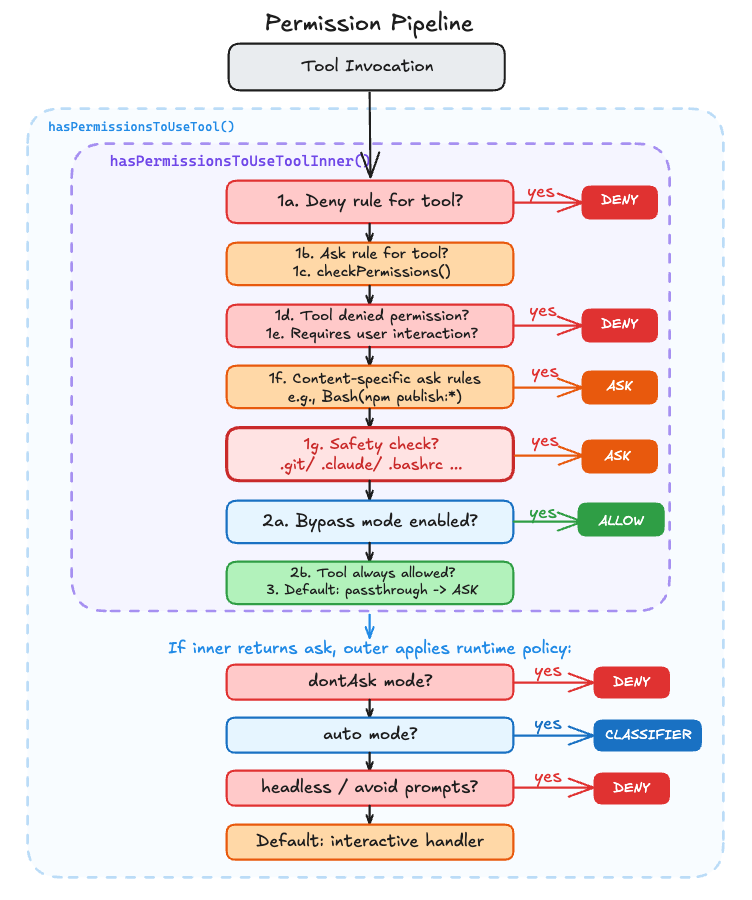
The inner function is a waterfall of early returns. It walks through a series of checks in order, and the moment any check produces a definitive answer, it returns immediately and skips the rest. For example, step 1b only runs if 1a didn’t match (the tool wasn’t fully denied). Each step catches a progressively narrower scenario:
src/utils/permissions/permissions.ts:L1158-L1319
async function hasPermissionsToUseToolInner(
  tool: Tool,
  input: { [key: string]: unknown },
  context: ToolUseContext,
): Promise<PermissionDecision> {
  // 1a. Entire tool is denied
  const denyRule = getDenyRuleForTool(appState.toolPermissionContext, tool)
  if (denyRule) {
    return { behavior: 'deny', /* ... */ }
  }

  // 1b. Entire tool requires ask
  const askRule = getAskRuleForTool(appState.toolPermissionContext, tool)
  // ...

  // 1c. Ask the tool implementation for a permission result
  toolPermissionResult = await tool.checkPermissions(parsedInput, context)

  // 1d. Tool implementation denied permission
  // 1e. Tool requires user interaction even in bypass mode
  // 1f. Content-specific ask rules (e.g., Bash(npm publish:*))
  // 1g. Safety checks (.git/, .claude/) — bypass-immune

  // 2a. Check if mode allows the tool to run
  if (shouldBypassPermissions) {
    return { behavior: 'allow', /* ... */ }
  }

  // 2b. Entire tool is always allowed
  // 3. Convert "passthrough" to "ask"
}
The ordering is deliberate. Steps 1a through 1g all check for reasons to block or prompt, and they run before the mode check at step 2a. If none of those checks returned early, the function reaches step 2a and checks whether the current mode allows the tool to run without asking. A deny rule in your settings.json hits at step 1a and blocks execution even in bypassPermissions mode. The tool never fires.
Safety Checks That Bypass Mode Can’t Skip
Step 1g checks for safety-sensitive paths, and bypass mode cannot skip it:
src/utils/permissions/permissions.ts:L1252-L1260
// 1g. Safety checks (e.g. .git/, .claude/, .vscode/, shell configs) are
// bypass-immune — they must prompt even in bypassPermissions mode.
if (
  toolPermissionResult?.behavior === 'ask' &&
  toolPermissionResult.decisionReason?.type === 'safetyCheck'
) {
  return toolPermissionResult
}
What counts as “safety-sensitive”? A hardcoded list:
src/utils/permissions/filesystem.ts:L57-L79
export const DANGEROUS_FILES = [
  '.gitconfig', '.gitmodules', '.bashrc', '.bash_profile',
  '.zshrc', '.zprofile', '.profile', '.ripgreprc',
  '.mcp.json', '.claude.json',
] as const

export const DANGEROUS_DIRECTORIES = [
  '.git', '.vscode', '.idea', '.claude',
] as const
Even with --dangerously-skip-permissions, Claude Code will still prompt before touching your .bashrc or writing inside .git/. These safety checks sit above bypass mode.
Why these files specifically? A modified .bashrc executes the next time you open a shell. A poisoned .gitconfig fires on the next git command. The damage happens long after the permission prompt is forgotten. Even a user who chose --dangerously-skip-permissions probably didn’t mean to give Claude write access to their shell profile.
One more defense is normalizeCaseForComparison() lowercasing all paths before checking against the dangerous list, preventing a .cLauDe/Settings.locaL.json bypass on macOS or Windows.
How Bash Rules Match
The core pipeline handles tool-level deny/allow, but individual tools implement their own permission logic through checkPermissions(). Bash is the most complex case. It runs AST-based injection detection via tree-sitter to parse shell commands, then matches them against rules.
The rule matching supports wildcard patterns:
src/utils/permissions/shellRuleMatching.ts:L90-L154
export function matchWildcardPattern(
  pattern: string, command: string, caseInsensitive = false,
): boolean {
  // ...
  // Convert unescaped * to .* for wildcard matching
  const withWildcards = escaped.replace(/\*/g, '.*')
  // ...
  // 'git *' matches both 'git add' and bare 'git'
  if (regexPattern.endsWith(' .*') && unescapedStarCount === 1) {
    regexPattern = regexPattern.slice(0, -3) + '( .*)?'
  }
  // ...
}
Bash(git *) matches git, git add, and git commit --amend, but not gitk or git-lfs. The trailing ( .*)? makes the space-and-arguments optional while keeping the command boundary strict. If you’ve configured "allow": ["Bash(npm *)"] in your settings, this function decides whether npm install passes while npm publish gets prompted.
Three Handlers, Three Trust Models
Once the pipeline returns “ask,” someone needs to resolve it. Claude Code runs in three execution contexts, and each handles permission prompts differently.
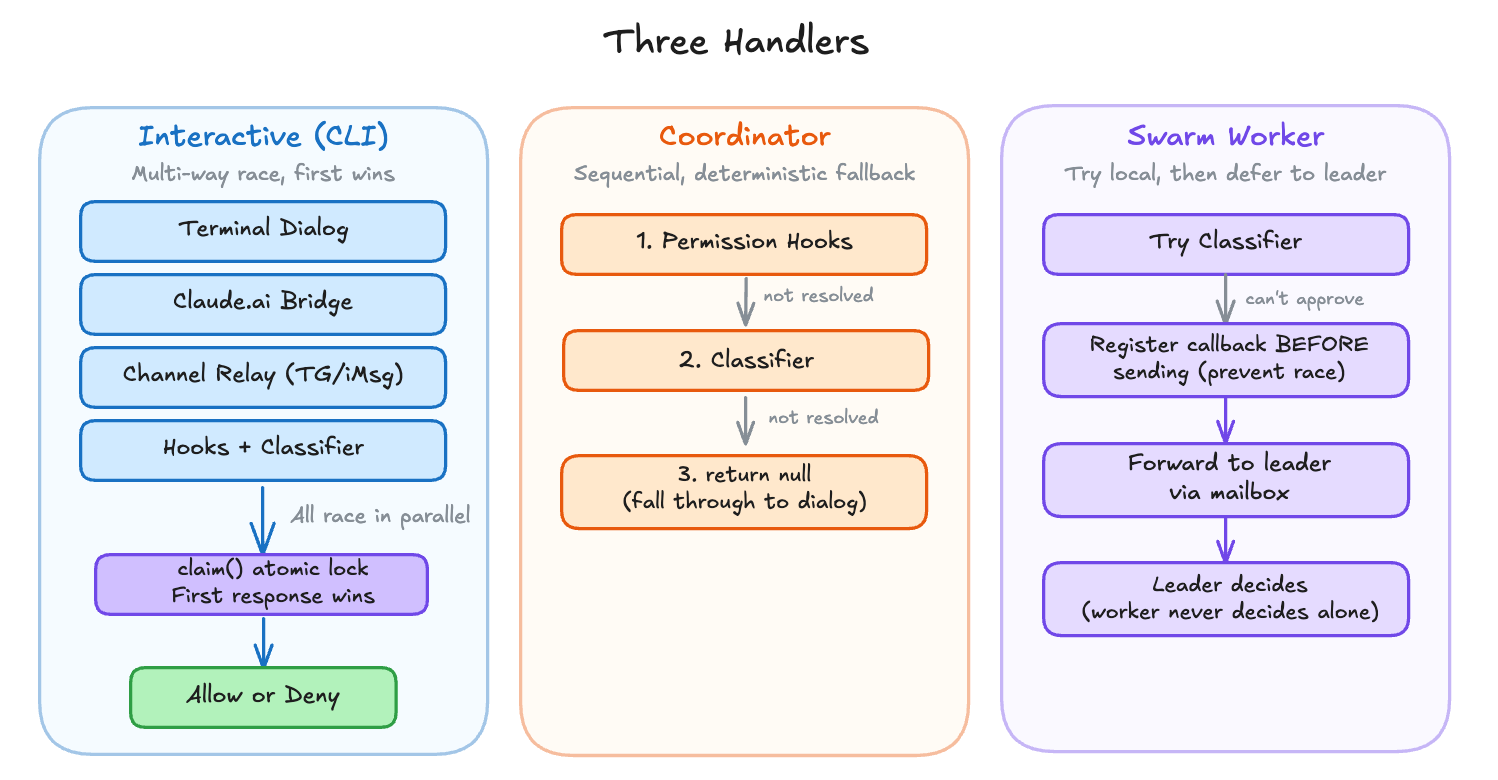
Interactive handler is the default CLI experience. It sets up a multi-way race between the user’s terminal dialog, the claude.ai bridge (if connected), channel MCP servers (Telegram, iMessage), and automated checks (hooks + classifier). The first to resolve wins, guarded by an atomic lock:
src/hooks/toolPermission/handlers/interactiveHandler.ts:L57-L531
function handleInteractivePermission(
  params: InteractivePermissionParams,
  resolve: (decision: PermissionDecision) => void,
): void {
  const { resolve: resolveOnce, isResolved, claim } = createResolveOnce(resolve)
  let userInteracted = false
  // ...
  const permissionPromptStartTimeMs = Date.now()

  // Racer 1: Terminal dialog
  ctx.pushToQueue({
    onUserInteraction() {
      // Grace period: ignore interactions in the first 200ms to prevent
      // accidental keypresses from canceling the classifier prematurely
      const GRACE_PERIOD_MS = 200
      if (Date.now() - permissionPromptStartTimeMs < GRACE_PERIOD_MS) {
        return
      }
      userInteracted = true
      clearClassifierChecking(ctx.toolUseID)
    },
    async onAllow(updatedInput, permissionUpdates, feedback?, contentBlocks?) {
      if (!claim()) return
      channelUnsubscribe?.()
      resolveOnce(await ctx.handleUserAllow(/* ... */))
    },
    onReject(feedback?) {
      if (!claim()) return
      channelUnsubscribe?.()
      resolveOnce(ctx.cancelAndAbort(feedback))
    },
  })

  // Racer 2: Bridge permission response from claude.ai
  if (bridgeCallbacks && bridgeRequestId) {
    bridgeCallbacks.sendRequest(bridgeRequestId, ctx.tool.name, displayInput, /* ... */)
    bridgeCallbacks.onResponse(bridgeRequestId, response => {
      if (!claim()) return // Local user/hook/classifier already responded
      channelUnsubscribe?.()
      ctx.removeFromQueue()
      if (response.behavior === 'allow') {
        resolveOnce(ctx.buildAllow(response.updatedInput ?? displayInput))
      } else {
        resolveOnce(ctx.cancelAndAbort(response.message))
      }
    })
  }

  // Racer 3: Channel MCP servers (Telegram, iMessage, etc.)
  if (channelCallbacks && !ctx.tool.requiresUserInteraction?.()) {
    // ... send permission request to channels via MCP notification
    channelCallbacks.onResponse(channelRequestId, response => {
      if (!claim()) return // Another racer won
      ctx.removeFromQueue()
      // ... resolve allow or deny
    })
  }

  // Racer 4: Permission hooks (async)
  void (async () => {
    if (isResolved()) return
    const hookDecision = await ctx.runHooks(/* ... */)
    if (!hookDecision || !claim()) return
    channelUnsubscribe?.()
    ctx.removeFromQueue()
    resolveOnce(hookDecision)
  })()

  // Racer 5: Bash classifier (async)
  if (result.pendingClassifierCheck && ctx.tool.name === BASH_TOOL_NAME) {
    void executeAsyncClassifierCheck(result.pendingClassifierCheck, /* ... */, {
      shouldContinue: () => !isResolved() && !userInteracted,
      onAllow: decisionReason => {
        if (!claim()) return
        channelUnsubscribe?.()
        resolveOnce(ctx.buildAllow(ctx.input, { decisionReason }))
      },
    })
  }
}
Five racers launch in parallel. Each one guards with if (!claim()) return before resolving, so only the first response takes effect. When one racer wins, it cleans up the others: canceling the bridge request, unsubscribing from channels, and removing the terminal dialog from the queue. The 200ms grace period on onUserInteraction prevents a stray keypress from canceling a classifier check that’s about to auto-approve.
Coordinator handler is for multi-agent orchestration. It runs hooks first, then the classifier, sequentially:
src/hooks/toolPermission/handlers/coordinatorHandler.ts:L26-L62
async function handleCoordinatorPermission(
  params: CoordinatorPermissionParams,
): Promise<PermissionDecision | null> {
  const { ctx, updatedInput, suggestions, permissionMode } = params

  try {
    // 1. Try permission hooks first (fast, local)
    const hookResult = await ctx.runHooks(permissionMode, suggestions, updatedInput)
    if (hookResult) return hookResult

    // 2. Try classifier (slow, inference -- bash only)
    const classifierResult = feature('BASH_CLASSIFIER')
      ? await ctx.tryClassifier?.(params.pendingClassifierCheck, updatedInput)
      : null
    if (classifierResult) return classifierResult
  } catch (error) {
    // If automated checks fail unexpectedly, fall through to show the dialog
    if (error instanceof Error) {
      logError(error)
    } else {
      logError(new Error(`Automated permission check failed: ${String(error)}`))
    }
  }

  // 3. Neither resolved -- fall through to dialog
  return null
}
A coordinator worker shouldn’t race its leader for input. Sequential checks, deterministic fallback. If both hooks and classifier fail to resolve, it returns null and the caller falls through to the interactive dialog.
Swarm worker handler is for parallel agent swarms. It tries the classifier locally, then forwards the request to the leader via mailbox:
src/hooks/toolPermission/handlers/swarmWorkerHandler.ts:L40-L156
async function handleSwarmWorkerPermission(
  params: SwarmWorkerPermissionParams,
): Promise<PermissionDecision | null> {
  // Try classifier auto-approval before forwarding to the leader
  const classifierResult = feature('BASH_CLASSIFIER')
    ? await ctx.tryClassifier?.(params.pendingClassifierCheck, updatedInput)
    : null
  if (classifierResult) return classifierResult

  // Forward permission request to the leader via mailbox
  const decision = await new Promise<PermissionDecision>(resolve => {
    const { resolve: resolveOnce, claim } = createResolveOnce(resolve)

    const request = createPermissionRequest({
      toolName: ctx.tool.name,
      toolUseId: ctx.toolUseID,
      input: ctx.input,
      description,
    })

    // Register callback BEFORE sending to avoid race condition
    registerPermissionCallback({
      requestId: request.id,
      toolUseId: ctx.toolUseID,
      async onAllow(allowedInput, permissionUpdates, feedback?, contentBlocks?) {
        if (!claim()) return
        resolveOnce(await ctx.handleUserAllow(/* ... */))
      },
      onReject(feedback?) {
        if (!claim()) return
        resolveOnce(ctx.cancelAndAbort(feedback))
      },
    })

    void sendPermissionRequestViaMailbox(request)
  })

  return decision
}
The worker never makes autonomous security decisions. If the classifier can’t auto-approve, the leader decides. Notice the callback is registered before sending the mailbox request, preventing a race where the leader responds before the worker is ready to receive.
All three handlers share the same seven-step pipeline. The difference is what happens when the pipeline says “ask.” The interactive handler races multiple input sources. The coordinator runs hooks and the classifier sequentially before falling back to a dialog. The swarm worker forwards the question to its leader.
Auto Mode’s Three Fast-Paths
When auto mode is enabled, Claude Code does more than “send the action to a classifier.” The outer hasPermissionsToUseTool() wrapper tries three progressively broader paths:
acceptEditsreplay: re-run the tool’s owncheckPermissions()withmode: 'acceptEdits'. If the action would be allowed there, skip the classifier entirely.Safe-tool allowlist: some tools are allowlisted as safe enough to skip YOLO classification.
Classifier: only if both fast-paths fail does Claude Code build an action from the transcript and send it to the auto-mode classifier.
That means auto mode is not just “classifier or prompt.” It is a layered optimization pipeline designed to save classifier calls for the ambiguous cases.
The fail-closed part comes next. The system tracks consecutive denials and falls back to prompting:
src/utils/permissions/denialTracking.ts:L12-L45
export const DENIAL_LIMITS = {
  maxConsecutive: 3,
  maxTotal: 20,
} as const

export function recordDenial(state: DenialTrackingState): DenialTrackingState {
  return {
    ...state,
    consecutiveDenials: state.consecutiveDenials + 1,
    totalDenials: state.totalDenials + 1,
  }
}

export function recordSuccess(state: DenialTrackingState): DenialTrackingState {
  if (state.consecutiveDenials === 0) return state
  return {
    ...state,
    consecutiveDenials: 0,
  }
}

export function shouldFallbackToPrompting(state: DenialTrackingState): boolean {
  return (
    state.consecutiveDenials >= DENIAL_LIMITS.maxConsecutive ||
    state.totalDenials >= DENIAL_LIMITS.maxTotal
  )
}
Three consecutive denials, or twenty total in a session, and auto mode gives up. Any successful tool use resets the consecutive counter but not the total. In CLI mode, the system falls back to the interactive dialog. In headless mode, it throws an AbortError.
Inside the Classifier
The “classifier” is not a traditional ML classifier. It’s a separate Claude API call, distinct from the main conversation. It makes up to two LLM calls to decide whether the pending tool call should be blocked. Stage 1 is a fast, conservative check. Stage 2 only fires if stage 1 said “block,” and uses chain-of-thought reasoning to reduce false positives. This two-pass design minimizes latency for safe commands while catching edge cases where stage 1 was too aggressive.
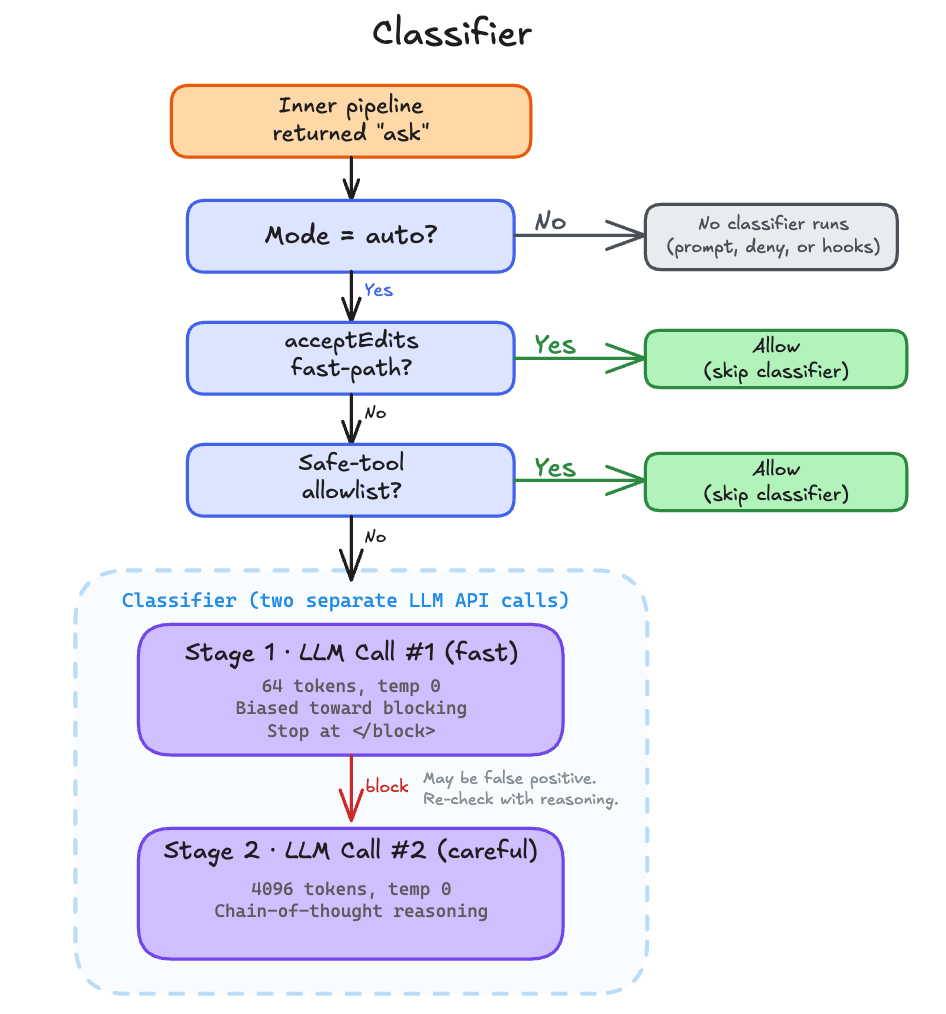
The classifier runs in two stages.
src/utils/permissions/yoloClassifier.ts:L550-L561
const XML_S1_SUFFIX = '\nErr on the side of blocking. <block> immediately.'

const XML_S2_SUFFIX =
  '\nReview the classification process and follow it carefully, ' +
  'making sure you deny actions that should be blocked. As a reminder, ' +
  'explicit (not suggestive or implicit) user confirmation is required ' +
  'to override blocks. Use <thinking> before responding with <block>.'
Stage 1 is the fast pass. It appends XML_S1_SUFFIX, caps max_tokens at 64, and sets </block> as a stop sequence, a Claude API parameter that terminates generation the moment that string appears in the output. (In fast-only mode, the stop sequence is dropped and max_tokens rises to 256 so the response can include a <reason> tag.) If stage 1 says “allow,” the classifier returns immediately. If stage 1 says “block,” it escalates to stage 2.
src/utils/permissions/yoloClassifier.ts:L771-L823
// Stage 1: fast (suffix nudges immediate <block> decision)
if (mode !== 'thinking') {
  stage1Opts = {
    model,
    max_tokens: (mode === 'fast' ? 256 : 64) + thinkingPadding,
    temperature: 0,
    // ...
    ...(mode !== 'fast' && { stop_sequences: ['</block>'] }),
  }
  const stage1Raw = await sideQuery(stage1Opts)
  const stage1Block = parseXmlBlock(extractTextContent(stage1Raw.content))

  // If stage 1 says allow, return immediately (fast path)
  if (stage1Block === false) {
    return {
      shouldBlock: false,
      reason: 'Allowed by fast classifier',
      // ...
    }
  }
}

// Stage 2: thinking (suffix asks for chain-of-thought)
const stage2Opts = {
  model,
  max_tokens: 4096 + thinkingPadding,
  temperature: 0,
  // ...
}
const stage2Raw = await sideQuery(stage2Opts)
Stage 2 gets 4096 tokens and asks for chain-of-thought reasoning before the <block> tag. The design is intentional. Stage 1 errs toward blocking (XML_S1_SUFFIX says so). Stage 2 does the more careful analysis to reduce false positives on commands that look dangerous but aren’t. Both stages run at temperature 0 and share the same system prompt, which benefits from prompt caching across calls.
The output is XML tags, not tool use. parseXmlBlock() extracts <block>yes</block> or <block>no</block> from the response, with a stripThinking() pass first to avoid matching tags inside the model’s chain-of-thought reasoning.
src/utils/permissions/yoloClassifier.ts:L567-L584
function stripThinking(text: string): string {
  return text
    .replace(/<thinking>[\s\S]*?<\/thinking>/g, '')
    .replace(/<thinking>[\s\S]*$/, '')
}

function parseXmlBlock(text: string): boolean | null {
  const matches = [
    ...stripThinking(text).matchAll(/<block>(yes|no)\b(<\/block>)?/gi),
  ]
  if (matches.length === 0) return null
  return matches[0]![1]!.toLowerCase() === 'yes'
}
One more design choice worth calling out. The classifier’s input transcript deliberately excludes assistant text blocks.
src/utils/permissions/yoloClassifier.ts:L341-L356
} else if (msg.type === 'assistant') {
  const blocks: TranscriptBlock[] = []
  for (const block of msg.message.content) {
    // Only include tool_use blocks — assistant text is model-authored
    // and could be crafted to influence the classifier's decision.
    if (block.type === 'tool_use') {
      blocks.push({
        type: 'tool_use',
        name: block.name,
        input: block.input,
      })
    }
  }
The classifier sees what the user asked and what tools the assistant invoked, but not the assistant’s prose. If the main model were compromised or manipulated, it could write persuasive text in its response designed to convince the classifier to approve a dangerous command. Stripping assistant text removes that attack vector entirely.
The system prompt is also worth noting. It’s assembled from a base template plus the user’s settings.autoMode rules (allow, soft_deny, environment) and the user’s CLAUDE.md content. The CLAUDE.md is wrapped in <user_claude_md> tags and treated as user intent, so rules like “always allow npm install” in your CLAUDE.md will inform the classifier’s decision. This means the classifier isn’t just applying static rules. It understands the context of what the user has asked for and the project’s conventions.