
Tool Design for AI Agents: Lessons from 50+ Claude Code Tools
Design · Every tool writes its own instructions, assembled at runtime. Patterns and takeaways for AI engineers building tool-use agents.

TL;DR
Each tool ships its own
prompt.ts. A four-stage pipeline assembles them into the system prompt at runtimeTools rewrite their own instructions every turn based on live context
WebFetchTool caps quotes at 125 characters on non-preapproved domains
FileWriteTool says “NEVER create documentation files”
CLAUDE_CODE_SIMPLE=1keeps only Bash, Read, and Edit
Claude Code's main prompts.ts covers tone, safety, and behavior, but says nothing about how to use any of the 50+ tools. Each tool writes its own instructions in a separate prompt.ts file, assembled at runtime into the prompt the model sees.
How Tools Reach the Model
The Anthropic Messages API accepts a tools parameter. Each object has a name (what the model calls), a description (natural-language instructions), and an input_schema (JSON Schema for parameters). The model calls a tool by outputting a tool_use block with the name and a JSON object matching the schema. That’s the full contract.
Claude Code fills this contract through a four-stage pipeline.
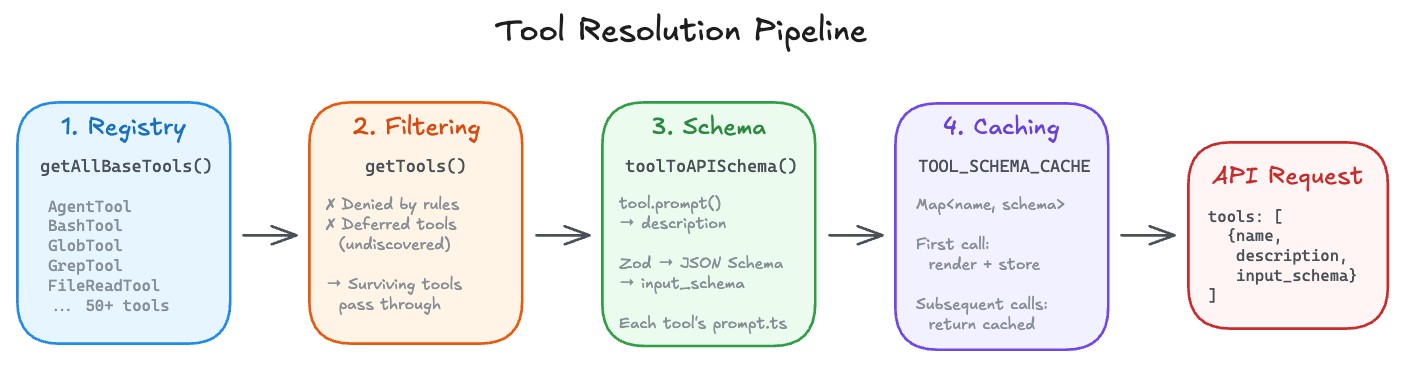
Stage 1. Registry. getAllBaseTools() in src/tools.ts returns every tool Claude Code knows about. The array is full of conditional spreads that gate tools behind feature flags, user types, and environment variables.
src/tools.ts:L199-L257
export function getAllBaseTools(): Tools {
  return [
    AgentTool,
    TaskOutputTool,
    BashTool,
    ...(hasEmbeddedSearchTools() ? [] : [GlobTool, GrepTool]),
    ExitPlanModeV2Tool,
    FileReadTool,
    FileEditTool,
    FileWriteTool,
    NotebookEditTool,
    WebFetchTool,
    // ... 40+ more tools
    ...(SleepTool ? [SleepTool] : []),
    ...cronTools,
    ...(RemoteTriggerTool ? [RemoteTriggerTool] : []),
  ]
}
Stage 2. Filtering. getTools() strips out tools the user has blanket-denied through permission rules. A deny rule matching mcp__server removes every tool from that MCP server before the model sees it. When ToolSearch is enabled, deferred tools are also filtered out unless already discovered in a prior turn.
src/services/api/claude.ts:L1160-L1167
filteredTools = tools.filter(tool => {
  // Always include non-deferred tools
  if (!deferredToolNames.has(tool.name)) return true
  // Always include ToolSearchTool (so it can discover more tools)
  if (toolMatchesName(tool, TOOL_SEARCH_TOOL_NAME)) return true
  // Only include deferred tools that have been discovered
  return discoveredToolNames.has(tool.name)
})
Stage 3. Schema rendering. Each surviving tool passes through toolToAPISchema(), which calls the tool’s async prompt() method for the description and converts its Zod schema to JSON Schema for input_schema. Results are cached per session.
src/utils/api.ts:L169-L178
base = {
  name: tool.name,
  description: await tool.prompt({
    getToolPermissionContext: options.getToolPermissionContext,
    tools: options.tools,
    agents: options.agents,
    allowedAgentTypes: options.allowedAgentTypes,
  }),
  input_schema,
}
Every tool implements prompt() as a required method on the Tool interface.
src/Tool.ts:L518-L523
prompt(options: {
  getToolPermissionContext: () => Promise<ToolPermissionContext>
  tools: Tools
  agents: AgentDefinition[]
  allowedAgentTypes?: string[]
}): Promise<string>
prompt() receives context about other tools, agents, and permissions. That’s how BashTool’s prompt can reference GrepTool by name, or AgentTool’s prompt can list available agent types. The tools are aware of each other.
Stage 4. Caching. toolSchemaCache.ts stores the rendered schema after the first API call. Every subsequent call reuses the cached version, even if a GrowthBook feature flag flips mid-session.
src/utils/toolSchemaCache.ts:L3-L18
// GrowthBook gate flips, MCP reconnects, or dynamic content in
// tool.prompt() all cause this churn. Memoizing per-session locks the
// schema bytes at first render.
const TOOL_SCHEMA_CACHE = new Map<string, CachedSchema>()
What the model receives looks like tools: [{name: "Bash", description: "Executes a given bash command...", input_schema: {...}}, {name: "Read", description: "Reads a file from the local filesystem...", input_schema: {...}}, ...] for every active tool.
The instructions are not written once. They’re assembled from separate prompt.ts files at request time, then locked for the session.
The Full Tool List
Here’s every tool registered in getAllBaseTools(). Some are always present. Others are gated behind feature flags, user types, or environment variables.
Always included: Agent, TaskOutput, Bash, ExitPlanMode, FileRead, FileEdit, FileWrite, NotebookEdit, WebFetch, TodoWrite, WebSearch, TaskStop, AskUserQuestion, Skill, EnterPlanMode, SendMessage, Brief (SendUserMessage), ListMcpResources, ReadMcpResource
Conditionally included: Glob and Grep (when embedded search tools are not available), Config (Anthropic internal), Tungsten (Anthropic internal), SuggestBackgroundPR (Anthropic internal), WebBrowser, TaskCreate, TaskGet, TaskUpdate, TaskList (TodoV2), OverflowTest, CtxInspect (context collapse), TerminalCapture, LSP, EnterWorktree, ExitWorktree, ListPeers, TeamCreate, TeamDelete (agent swarms), VerifyPlanExecution, REPL (Anthropic internal), Workflow, Sleep, CronCreate, CronDelete, CronList, RemoteTrigger, Monitor, SendUserFile, PushNotification, SubscribePR, PowerShell, Snip (history snip), ToolSearch
In CLAUDE_CODE_SIMPLE=1 mode, only Bash, FileRead, and FileEdit survive. That tells you which three tools are irreducible.
How the Four Core Tools Work
Anthropic hasn’t published per-tool usage statistics, so treat these four as illustrative. CLAUDE_CODE_SIMPLE=1 keeps only Bash, Read, and Edit, making those three obvious picks. Grep earns a spot because BashTool explicitly steers the model toward it instead of raw shell search.
BashTool (dynamically generated)
The most complex prompt in the codebase. Built from composable sections, not a string literal.
src/tools/BashTool/prompt.ts:L275-L369
export function getSimplePrompt(): string {
  const embedded = hasEmbeddedSearchTools()

  const toolPreferenceItems = [
    ...(embedded
      ? []
      : [
          `File search: Use ${GLOB_TOOL_NAME} (NOT find or ls)`,
          `Content search: Use ${GREP_TOOL_NAME} (NOT grep or rg)`,
        ]),
    `Read files: Use ${FILE_READ_TOOL_NAME} (NOT cat/head/tail)`,
    `Edit files: Use ${FILE_EDIT_TOOL_NAME} (NOT sed/awk)`,
    // ...
  ]

  return [
    'Executes a given bash command and returns its output.',
    '',
    '# Instructions',
    ...prependBullets(instructionItems),
    getSimpleSandboxSection(),
    ...(getCommitAndPRInstructions() ? ['', getCommitAndPRInstructions()] : []),
  ].join('\n')
}
The rendered output for an external user, condensed for readability.
Executes a given bash command and returns its output.

The working directory persists between commands, but shell state does not.

IMPORTANT: Avoid using this tool to run `find`, `grep`, `cat`, `head`, `tail`,
`sed`, `awk`, or `echo` commands. Instead, use the appropriate dedicated tool:
 - File search: Use Glob (NOT find or ls)
 - Content search: Use Grep (NOT grep or rg)
 - Read files: Use Read (NOT cat/head/tail)
 - Edit files: Use Edit (NOT sed/awk)
 - Write files: Use Write (NOT echo >/cat <<EOF)

# Instructions
 - Always quote file paths that contain spaces with double quotes
 - You may specify an optional timeout in milliseconds (up to 600000ms)
 - You can use the `run_in_background` parameter to run the command in the
   background.
 - When issuing multiple commands:
   - If independent, make multiple Bash tool calls in a single message.
   - If dependent, use '&&' to chain them.
   - DO NOT use newlines to separate commands.
 - For git commands:
   - Prefer to create a new commit rather than amending.
   - Never skip hooks (--no-verify) unless the user explicitly asked.
 - Avoid unnecessary `sleep` commands.

## Command sandbox
[Live sandbox filesystem/network restrictions serialized as JSON]

# Committing changes with git
[80-line manual with Git Safety Protocol, step-by-step commit workflow,
 HEREDOC formatting, PR creation templates]
Notice the IMPORTANT block up top. Without it, the model reaches for grep, cat, and sed by default instead of using the dedicated tools.
FileReadTool (template function)
A runtime template that computes file size limits and line format instructions.
src/tools/FileReadTool/prompt.ts:L27-L49
export function renderPromptTemplate(
  lineFormat: string,
  maxSizeInstruction: string,
  offsetInstruction: string,
): string {
  return `Reads a file from the local filesystem. You can access any file
directly by using this tool.
Assume this tool is able to read all files on the machine.

Usage:
- The file_path parameter must be an absolute path, not a relative path
- By default, it reads up to ${MAX_LINES_TO_READ} lines starting from
  the beginning of the file${maxSizeInstruction}
${offsetInstruction}
${lineFormat}
- This tool can read images (eg PNG, JPG, etc). When reading an image file
  the contents are presented visually as Claude Code is a multimodal LLM.
- This tool can read PDF files (.pdf). For large PDFs (more than 10 pages),
  you MUST provide the pages parameter to read specific page ranges.
- This tool can read Jupyter notebooks (.ipynb files).
- This tool can only read files, not directories. To read a directory,
  use an ls command via the Bash tool.`
lineFormat and maxSizeInstruction as template parameters let this serve different deployment contexts.
FileEditTool (adapts to user type)
src/tools/FileEditTool/prompt.ts:L1-L28
function getDefaultEditDescription(): string {
  const prefixFormat = isCompactLinePrefixEnabled()
    ? 'line number + tab'
    : 'spaces + line number + arrow'
  const minimalUniquenessHint =
    process.env.USER_TYPE === 'ant'
      ? `\n- Use the smallest old_string that's clearly unique — usually
         2-4 adjacent lines is sufficient. Avoid including 10+ lines
         of context when less uniquely identifies the target.`
      : ''
  return `Performs exact string replacements in files.

Usage:
- You must use your Read tool at least once in the conversation before
  editing. This tool will error if you attempt an edit without reading.
- When editing text from Read tool output, ensure you preserve the exact
  indentation (tabs/spaces) as it appears AFTER the line number prefix.
  The line number prefix format is: ${prefixFormat}.
- ALWAYS prefer editing existing files. NEVER write new files unless
  explicitly required.
- The edit will FAIL if old_string is not unique in the file.${minimalUniquenessHint}
- Use replace_all for replacing and renaming strings across the file.`
}
Internal users get that extra old_string minimality hint. External users don’t. The “read before edit” rule is enforced twice, once in the prompt and once in the tool code itself.
GrepTool (static)
src/tools/GrepTool/prompt.ts:L1-L18
export function getDescription(): string {
  return `A powerful search tool built on ripgrep

  Usage:
  - ALWAYS use Grep for search tasks. NEVER invoke grep or rg as a
    Bash command. The Grep tool has been optimized for correct
    permissions and access.
  - Supports full regex syntax (e.g., "log.*Error", "function\\s+\\w+")
  - Filter files with glob parameter or type parameter
  - Output modes: "content" shows matching lines, "files_with_matches"
    shows only file paths (default), "count" shows match counts
  - Use Agent tool for open-ended searches requiring multiple rounds
  - Pattern syntax: Uses ripgrep (not grep) - literal braces need
    escaping (use interface\\{\\} to find interface{} in Go code)
  - Multiline matching: By default patterns match within single lines
    only. For cross-line patterns, use multiline: true
`
}
Grep is just a static string. No conditionals, no templates. Bash’s prompt is dynamically assembled from composable sections. The gap in complexity roughly maps to how much damage each tool can do.
A Closer Look at the Tools
WebFetchTool. Quotes capped at 125 characters.
WebFetch doesn’t just fetch web pages. It processes them through a secondary model that gets different instructions depending on the domain.
src/tools/WebFetchTool/prompt.ts:L23-L46
export function makeSecondaryModelPrompt(
  markdownContent: string,
  prompt: string,
  isPreapprovedDomain: boolean,
): string {
  const guidelines = isPreapprovedDomain
    ? `Provide a concise response based on the content above. Include
       relevant details, code examples, and documentation excerpts
       as needed.`
    : `Provide a concise response based only on the content above.
       - Enforce a strict 125-character maximum for quotes from any
         source document. Open Source Software is ok as long as we
         respect the license.
       - Use quotation marks for exact language from articles.
       - You are not a lawyer and never comment on the legality of
         your own prompts and responses.
       - Never produce or reproduce exact song lyrics.`
Pre-approved domains get no quote limit. Everything else gets the 125-character cap. The “you are not a lawyer” line stops the model from hedging about copyright. The song lyrics line is there because LLMs tend to reproduce copyrighted lyrics when asked.
WebSearchTool. The current year is hardcoded into every search.
export function getWebSearchPrompt(): string {
  const currentMonthYear = getLocalMonthYear()
  return `
IMPORTANT - Use the correct year in search queries:
  - The current month is ${currentMonthYear}. You MUST use this year
    when searching for recent information.
  - Example: If the user asks for "latest React docs", search for
    "React documentation" with the current year, NOT last year`
Without this, the model’s knowledge cutoff means it might search for “React 18 docs 2024” instead of the current year. The month is computed at runtime and interpolated into the prompt.
The prompt also has a “CRITICAL REQUIREMENT” telling the model to include source URLs after every web search answer. You can almost see the iteration history in the emphasis level. Each escalation was probably added after a round where the model kept dropping the links.
BashTool. A prompt that knows which peer tools exist.
hasEmbeddedSearchTools() checks whether the Bun binary has bfs and ugrep embedded. When it does, Glob and Grep are removed from the session, and BashTool’s prompt stops telling the model to avoid find and grep. It even swaps the blacklist in its opening paragraph.
const avoidCommands = embedded
  ? '`cat`, `head`, `tail`, `sed`, `awk`, or `echo`'
  : '`find`, `grep`, `cat`, `head`, `tail`, `sed`, `awk`, or `echo`'
In one configuration, grep is forbidden. In another, it’s recommended. The prompt function is the same, but the behavior flips depending on which peer tools are loaded.
When embedded tools are available, the prompt also adds a warning you’d never need in the non-embedded build.
"When using `find -regex` with alternation, put the longest alternative
first. Example: use `'.*\\.\\(tsx\\|ts\\)'` not `'.*\\.\\(ts\\|tsx\\)'`
— the second form silently skips `.tsx` files."
bfs uses Oniguruma (a regex engine originally written for Ruby) for -regex, which picks the first matching alternative (leftmost-first), unlike GNU find’s POSIX leftmost-longest. The prompt surfaces this so the model doesn’t silently miss files.
BashTool. Two different git manuals for two user types.
Internal Anthropic users get 8 lines pointing to /commit and /commit-push-pr skills.
if (process.env.USER_TYPE === 'ant') {
  return `# Git operations\n\n${skillsSection}
  IMPORTANT: NEVER skip hooks (--no-verify, --no-gpg-sign, etc)...`
}
External users get a full manual with a Git Safety Protocol.
NEVER update the git config
NEVER run destructive git commands (push --force, reset --hard, checkout .) unless explicitly requested
NEVER skip hooks (--no-verify, --no-gpg-sign) unless explicitly requested
NEVER run force push to main/master
ALWAYS create NEW commits rather than amending (to avoid destroying previous work when pre-commit hooks fail)
When staging files, prefer adding specific files by name rather than
git add -Aorgit add .NEVER commit changes unless the user explicitly asks
The “Important notes” section below the workflow adds two more constraints. Never use git commands with the -i flag (interactive mode is not supported), and never use --no-edit with rebase.
The prompt also includes a numbered step-by-step commit workflow with parallel tool call recommendations, HEREDOC formatting examples, and PR creation templates with gh pr create.
For an external user, that 80-line manual is part of the system prompt Claude Code sends. Every commit instruction in that flow comes from BashTool/prompt.ts.
BashTool. Live sandbox configuration serialized into the prompt.
getSimpleSandboxSection() reads the current sandbox configuration and serializes it as JSON directly into the prompt.
src/tools/BashTool/prompt.ts:L172-L273
function getSimpleSandboxSection(): string {
  if (!SandboxManager.isSandboxingEnabled()) {
    return ''
  }
  const fsReadConfig = SandboxManager.getFsReadConfig()
  const fsWriteConfig = SandboxManager.getFsWriteConfig()
  // ...
  restrictionsLines.push(`Filesystem: ${jsonStringify(filesystemConfig)}`)
  restrictionsLines.push(`Network: ${jsonStringify(networkConfig)}`)
}
The model sees the actual filesystem allow lists and network restrictions as JSON. If sandbox settings change between sessions, the prompt updates automatically.
User-specific temp directory paths like /private/tmp/claude-1001/ are also replaced with $TMPDIR before embedding.
const normalizeAllowOnly = (paths: string[]): string[] =>
  [...new Set(paths)].map(p => (p === claudeTempDir ? '$TMPDIR' : p))
Anthropic’s API caches prompt prefixes. If user A’s prompt has /private/tmp/claude-1001/ and user B’s has /private/tmp/claude-1002/, the prefixes diverge and each needs its own cache entry. Replacing both with $TMPDIR makes them identical, so they share one cache hit. new Set() also deduplicates sandbox paths, since SandboxManager merges config from multiple sources and the same path can appear 3 times.
FileReadTool. “Assume this tool is able to read all files on the machine.”
The prompt is blunt. It tells the model to assume it can read all files, and that “it is okay to read a file that does not exist; an error will be returned.” Without this, the model might say “I can’t read that file” instead of just trying and letting the error come back.
The prompt also has a conditional block for PDF support.
${isPDFSupported()
  ? '\n- This tool can read PDF files (.pdf). For large PDFs...'
  : ''}
If the library isn’t there, the model never learns it could read PDFs, so it won’t try.
FileReadTool also has a FILE_UNCHANGED_STUB constant.
export const FILE_UNCHANGED_STUB =
  'File unchanged since last read. The content from the earlier Read
   tool_result in this conversation is still current — refer to that
   instead of re-reading.'
When the model re-reads a file that hasn’t changed, it gets this stub instead of the full content, saving tokens on repeated reads.
FileEditTool. A minimal uniqueness hint only for internal users.
External users learn that edits fail if old_string isn’t unique. Internal users get an extra nudge.
const minimalUniquenessHint =
  process.env.USER_TYPE === 'ant'
    ? `\n- Use the smallest old_string that's clearly unique — usually
       2-4 adjacent lines is sufficient.`
    : ''
The “read before edit” rule is also enforced at the tool level. It errors out if you haven’t called Read first.
FileWriteTool. The anti-documentation instinct.
return `Writes a file to the local filesystem.

Usage:
- NEVER create documentation files (*.md) or README files unless
  explicitly requested by the User.
- Only use emojis if the user explicitly requests it.`
“NEVER create documentation files” exists because LLMs tend to create READMEs, CONTRIBUTING guides, and other docs the user didn’t ask for. This line stops that.
The emoji ban is there for the same reason. Without it, the model might add emoji to file contents like commit messages and code comments.
GrepTool. Why raw rg in Bash is banned.
ALWAYS use Grep for search tasks. NEVER invoke grep or rg as a Bash
command. The Grep tool has been optimized for correct permissions and access.
“Optimized for correct permissions and access” is doing a lot of work. Grep handles sandbox permissions, file read ignore patterns, and plugin cache exclusions. Running raw rg in Bash bypasses all of that.
There’s also a gotcha for Go developers.
Pattern syntax: Uses ripgrep (not grep) - literal braces need escaping
(use interface\{\} to find interface{} in Go code)
The model knows grep syntax from training data, but the underlying engine is ripgrep. Unescaped braces in ripgrep are quantifiers, not literals, so searching for interface{} without escaping silently matches the wrong things.
GlobTool. Results sorted by modification time.
Glob returns matching file paths sorted by modification time, not alphabetically. Recently-changed files are more likely to be relevant to the user’s current task. When the model searches for **/*.ts, the most recently modified files appear first.
AgentTool. Moving the agent list saved 10.2% of cache tokens.
The agent list used to be embedded in the tool’s description. Whenever an MCP server connected, a plugin reloaded, or permissions changed, the list would change and bust the entire tool-schema prompt cache.
src/tools/AgentTool/prompt.ts:L48-L64
/**
 * The dynamic agent list was ~10.2% of fleet cache_creation tokens: MCP
 * async connect, /reload-plugins, or permission-mode changes mutate the
 * list → description changes → full tool-schema cache bust.
 */
export function shouldInjectAgentListInMessages(): boolean {
  // ...
  return getFeatureValue_CACHED_MAY_BE_STALE('tengu_agent_list_attach', false)
}
The fix moved the agent list out of the tool description and into a system-reminder attachment message. The model still sees the list every turn, but the tool description is now a static string and the dynamic list lives in a later message position.
Anthropic’s API caches the prompt as a prefix, with system prompt and tool definitions at the top. If a tool definition changes, the prefix cache busts and the next call pays full “cache creation” cost. By keeping the tool definition stable and pushing volatile content later, the prefix stays cached even when the agent list changes. That saved 10.2% of fleet cache creation tokens.
AgentTool. “Don’t peek” and “Don’t race.”
When fork-subagent mode is enabled, the prompt adds rules for async operations.
**Don't peek.** The tool result includes an `output_file` path — do not
Read or tail it unless the user explicitly asks for a progress check.
Reading the transcript mid-flight pulls the fork's tool noise into your
context, which defeats the point of forking.

**Don't race.** After launching, you know nothing about what the fork
found. Never fabricate or predict fork results in any format — not as
prose, summary, or structured output.
Both rules come from real failure modes. Without “Don’t peek,” the model reads the fork’s output file while it’s still running and fills its own context with partial results. Without “Don’t race,” the model makes up what the fork found and presents fabricated results as real.
SleepTool. One line about cache expiry.
Each wake-up costs an API call, but the prompt cache expires after 5
minutes of inactivity — balance accordingly.
One line teaches the model about API cost trade-offs. The prompt cache expires after 5 minutes of inactivity, so a 6-minute sleep means the next call pays full cache creation cost again. The model gets enough to pick a reasonable duration.
ToolSearchTool. Lazy loading so the model doesn’t drown in schemas.
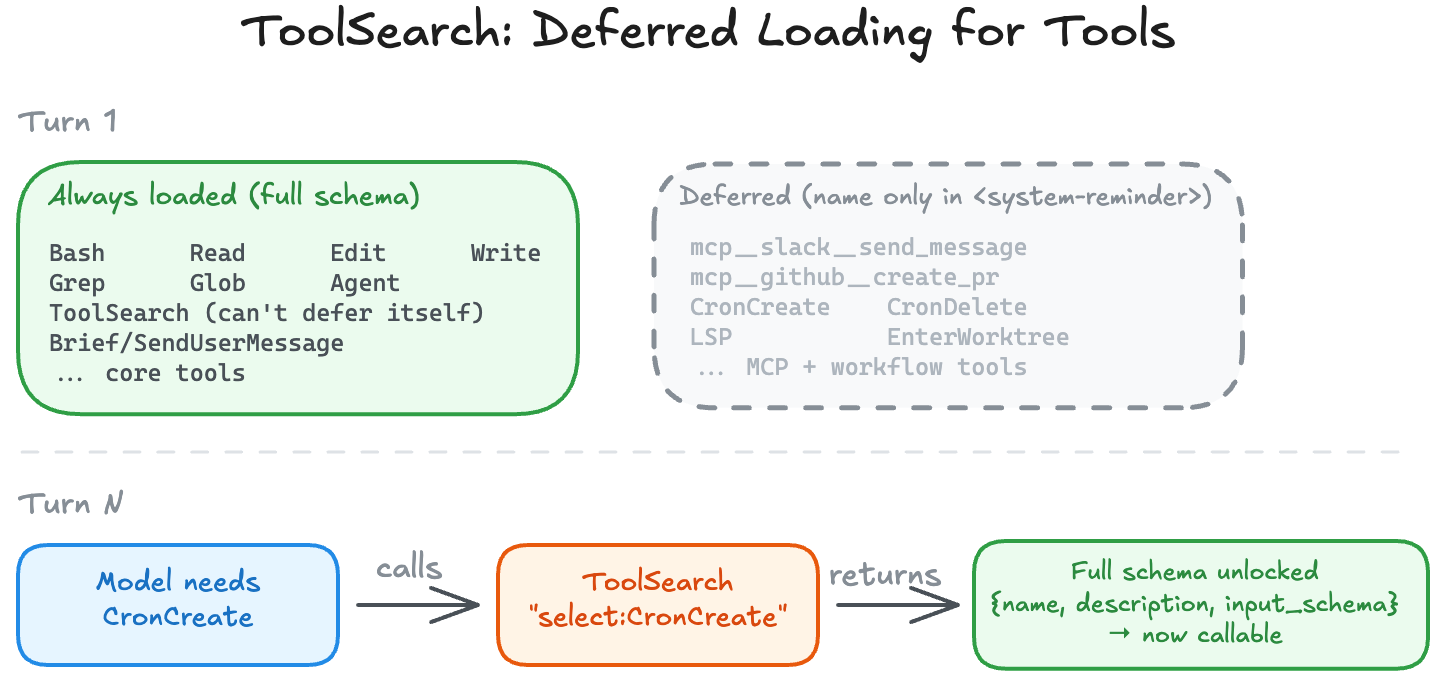
Not all 50+ tools load into the initial prompt. Some only show their names in a <system-reminder> message, and the model has to call ToolSearch to get the full schema before invoking them.
export function isDeferredTool(tool: Tool): boolean {
  if (tool.alwaysLoad === true) return false
  if (tool.isMcp === true) return true
  if (tool.name === TOOL_SEARCH_TOOL_NAME) return false
  // ...
  return tool.shouldDefer === true
}
But certain tools are carved out. ToolSearch itself can never be deferred, since you need it to discover everything else. AgentTool is never deferred when fork-subagent is enabled, since it needs to be available on the very first turn. Brief/SendUserMessage is never deferred either, since it’s the primary communication channel. MCP tools, on the other hand, are always deferred. They’re workflow-specific and there can be hundreds of them.
EnterPlanModeTool. Internal users skip the planning step.
External users see a prompt that encourages planning for nearly everything non-trivial.
User: "Add a delete button to the user profile"
→ Seems simple but involves: where to place it, confirmation dialog,
  API call, error handling, state updates
Internal users see a prompt that reserves planning for much larger tasks.
User: "Add a delete button to the user profile"
→ Implementation path is clear; just do it
The external version assumes the user wants to be consulted before significant work. The internal version trusts the developer to know what a delete button needs.
BriefTool (SendUserMessage). Text outside this tool might be invisible.
Send a message the user will read. Text outside this tool is visible in
the detail view, but most won't open it — the answer lives here.
In some modes, the visible output goes through this tool, not the model’s regular text stream. The prompt warns about this.
The failure mode: the real answer lives in plain text while
SendUserMessage just says "done!" — they see "done!" and miss everything.
Every user-facing response must go through SendUserMessage. “Even for ‘hi’. Even for ‘thanks’.” The model’s regular text stream becomes an internal monologue visible only in the detail view.
buildTool defaults. Security is the default.
const TOOL_DEFAULTS = {
  isEnabled: () => true,
  isConcurrencySafe: (_input?: unknown) => false,
  isReadOnly: (_input?: unknown) => false,
  isDestructive: (_input?: unknown) => false,
  checkPermissions: (...) => Promise.resolve({ behavior: 'allow', ... }),
}
isConcurrencySafe defaults to false. If you forget to declare your tool as concurrency-safe, it won’t run in parallel with other tools. isReadOnly also defaults to false. Forget to declare your tool as read-only, and it gets the full permission check. Both defaults are conservative on purpose. An incomplete tool definition fails safe, not open.